A Simpler DEVONthink Alternative for Mac When You Just Need to Find Things
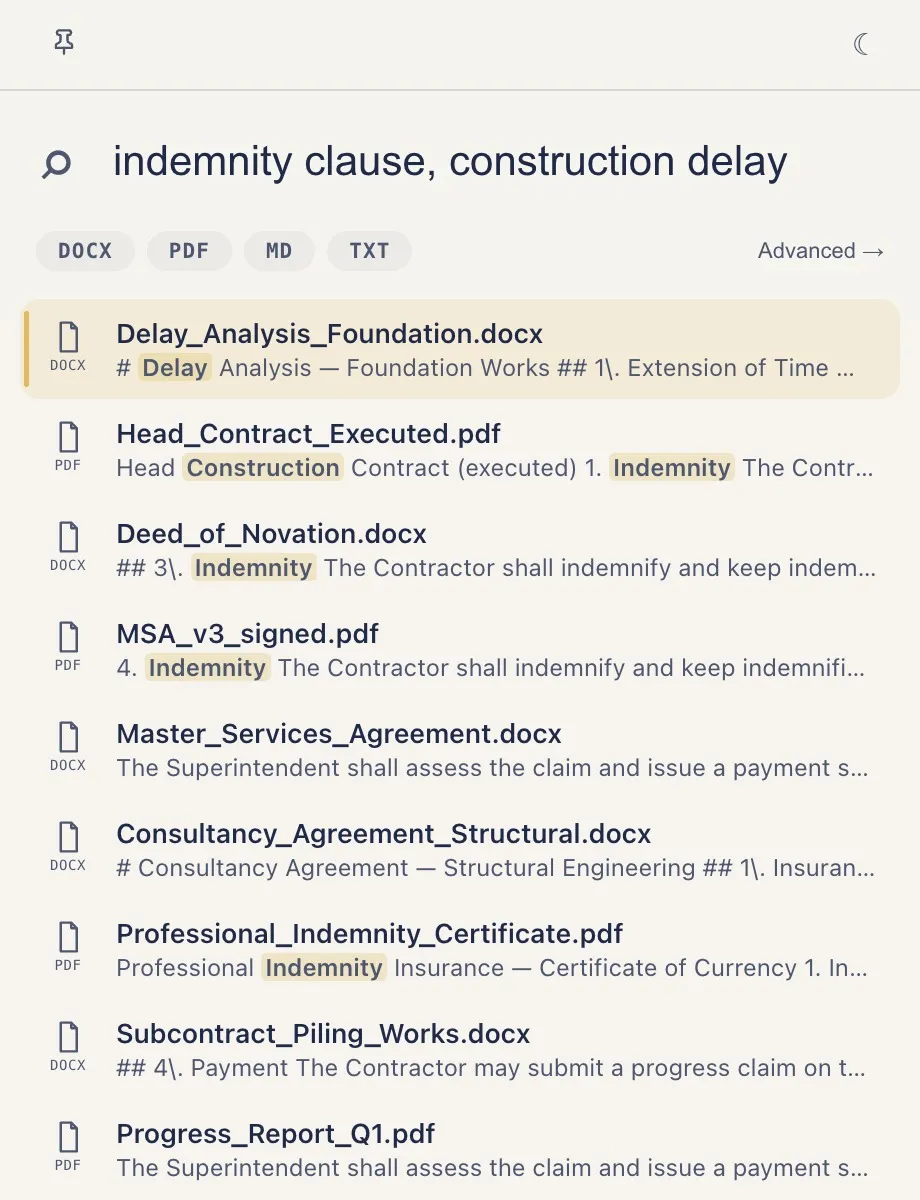
Short answer: If you mainly want to find documents rather than organise them, a simpler DEVONthink alternative for Mac is a search-only tool that indexes your existing folders in place. Fossick does this: it searches PDFs, Word files and scans by meaning, entirely on-device, with no databases, imports, groups or tagging to manage.
Free to try (1 folder, 200 files) · US$19.99 to keep · Mac & Windows
DEVONthink is a capable document manager, and many Mac users who buy it spend their first week learning databases, groups, replicants, smart rules and sync settings. That is a fair trade if you want a research workspace. It is a poor trade if what you actually wanted was to type "the email where the client pushed back on the indemnity cap" and get the right file.
This article is for that second group. It compares DEVONthink's database-and-organisation approach with a lighter option: a private, on-device search tool that leaves your folders exactly where they are and finds documents by what they mean. It covers what to look for in a simpler DEVONthink alternative for Mac, where each tool fits, and when you should stay with DEVONthink.
Why DEVONthink feels heavy if you only want to search
DEVONthink feels heavy for search-only use because it is designed as a complete information manager, not just a finder. According to DEVONtechnologies' own product page, it is a document manager for Apple platforms, and its feature set reflects that: databases, groups and tags, smart groups and rules, annotation, classification suggestions, and sync between devices.
To get value from it, you make a series of decisions up front:
- Import or index? Files can be copied into a DEVONthink database or indexed in place, and each choice behaves differently when you move or rename things in Finder.
- How many databases? One per client, one per project, or one large one.
- How to structure groups and tags so that the classification features have something to learn from.
- Whether and how to sync, and to which locations.
None of this is a flaw. It is the point of the product. But if your documents already live in sensible folders, in Finder, in a work drive or a client directory, and your real complaint is "I can't find the thing I know I have", then a database layer adds work without solving the core problem.
What a simpler DEVONthink alternative for Mac should do
A simpler DEVONthink alternative for Mac should find your documents where they already are, by meaning, without asking you to reorganise anything. In practice that means a short checklist:
- Index existing folders in place. Point it at a folder; it reads what is there. No import, no copies, no new structure to maintain.
- Search by meaning, not only keywords. Semantic search matches the intent of a query rather than the exact words, so "late payment penalty" can find a clause that says "interest accrues on overdue invoices".
- Read scans and images. Many professional archives are full of scanned agreements and photographed receipts. These need OCR before they are searchable.
- Stay on the device. If the documents are confidential, indexing and search should not depend on uploading them anywhere.
- Keep up quietly. When files change, only the changed files should be re-processed.
If you are unsure whether you need meaning-based search or classic keyword matching, our guide to full-text search vs semantic search walks through the difference with examples.
DEVONthink vs Spotlight vs Fossick at a glance
The short version: DEVONthink organises, Spotlight finds by keywords and metadata, and Fossick finds by meaning without organising.
| DEVONthink | Spotlight | Fossick | |
|---|---|---|---|
| Main job | Organise and research | Find files and apps | Find documents by meaning |
| Setup | Databases, groups, import or index | Built in | Pick a folder |
| Search style | Keyword, Boolean, related items | Mostly keywords and metadata | Semantic (meaning) |
| Scanned PDFs/images | OCR available | Limited | On-device OCR, automatic |
| Where it runs | On your Mac | On your Mac | On your Mac, works offline |
Spotlight deserves a mention because it costs nothing. Apple's Spotlight guide describes how it searches files and their contents, and it is fine when you remember a distinctive word or file name. It struggles when you only remember the gist. We cover that gap in more detail in a Spotlight alternative for document contents.
How Fossick works as a search-only tool
Fossick is a desktop app for Mac and Windows that searches your local documents by meaning, entirely offline, and does nothing else. You choose a folder, it builds a private index on your Mac, and you type what you remember.
What happens on your Mac
- Text extraction and OCR. It reads PDFs, Word (.docx, .doc), Excel (.xlsx), PowerPoint (.pptx), OpenDocument text (.odt), plain text, Markdown, CSV, HTML, email (.eml, .msg) and images (PNG, JPG). Scanned PDFs and images are made searchable with on-device OCR.
- Embedding. Each passage is turned into a vector by all-MiniLM-L6-v2, a small sentence-embedding model (384 dimensions, quantized, about 22 MB) that runs locally. This is the technique described in the Sentence-BERT paper: text is compared by meaning using vector similarity.
- Search. Your query is embedded the same way and matched against the index. Nothing is uploaded, and it works with Wi-Fi switched off. Only licensing touches the internet.
What it measured on an M1 MacBook
On an Apple M1 MacBook with 8 GB RAM (measured 2026-09-21, engine CLI), a 52-document mixed folder (Word, PDF including scanned pages, Excel, CSV, Markdown; 700 KB) indexed from scratch in about 81 seconds, including model load and OCR. Re-checking the same folder with nothing changed took about 7 seconds, the index was about 1.9 MB on disk, and semantic searches took about 15-20 ms median. Re-indexing is incremental, so only new or changed files are re-processed.
What it is not
Fossick is search, not chat. There is no chatbot, no generative AI and no summaries. It returns documents and passages; reading and judging them is still your job. For confidential work, many people see that as a feature rather than a gap.
When DEVONthink is still the better choice
DEVONthink remains the better choice if you use it as a workspace, not just a finder. Keep it, or choose it, if you:
- Annotate and link documents and want those notes stored alongside the files.
- Rely on smart rules to file, rename or tag incoming documents automatically.
- Use classification suggestions to sort new material into an existing group structure.
- Need sync across Mac, iPhone and iPad with your library available on each.
- Build research collections of web clippings, notes and documents that do not otherwise live in folders.
The two approaches can also coexist. Some people keep DEVONthink for an active research project and use a lighter search tool across everything else on their drive, such as old client files, past reports and scanned archives that will never be reorganised. If you also work on Windows, where DEVONthink is not available, see our DEVONthink alternative for Windows guide.
Switching without migrating anything
Because a search-only tool indexes folders in place, trying one does not require exporting or restructuring anything. A practical way to test it:
- Pick one real folder you search often, such as a client directory or a folder of scanned contracts.
- Write down three queries you have struggled with in Spotlight or DEVONthink, phrased the way you actually remember them.
- Index the folder and run those queries. Judge it on whether the right document appears near the top.
You can download Fossick and try it free with no sign-up or card on 1 folder of up to 200 files, which is enough for that test. If it suits you, a single one-time purchase of US$19.99 unlocks every folder and file and includes every future update, with a 14-day money-back guarantee; details are on the pricing page. Your original files are never moved or modified, so if you decide it is not for you, there is nothing to undo.
Frequently asked questions
Is there a DEVONthink alternative that doesn't require importing files?
Yes. Search-only tools such as Fossick index the folders you already have and leave the files where they are. DEVONthink itself can also index files in place, but you still work through its database structure. A search-only tool skips that layer entirely.
Is Fossick a replacement for DEVONthink?
Only if you mainly use DEVONthink to find documents. Fossick does not organise, tag, annotate or sync files, and it has no chat or summarising features. If you rely on those DEVONthink features, Fossick works better alongside it than instead of it.
Does Fossick send my documents to the cloud?
No. Text extraction, OCR, embedding and search all run on your Mac, and it works with Wi-Fi turned off. Only licensing touches the internet; your documents are never uploaded.
Can it search scanned PDFs and screenshots on a Mac?
Yes. Scanned PDFs and images such as PNG and JPG files are made searchable with on-device OCR, which runs automatically during indexing. Once indexed, they can be found by meaning like any other document. See our guide to searching scanned PDFs locally for more.
Why not just use Spotlight instead of DEVONthink?
Spotlight is a good free option when you remember a file name or a distinctive word. It is mostly keyword- and metadata-based, so it is less helpful when you only remember what a document was about. Semantic search fills that gap.