A Private, Offline Alternative to Notion for Searching Your Notes
Short answer: A private, offline alternative to Notion for searching notes is to keep your notes as local files (Markdown, Word, PDF or plain text) and search them with an on-device semantic search app such as Fossick, which finds notes by meaning without uploading anything. It replaces cloud-based note search, not Notion's editor or team collaboration.
Free to try (1 folder, 200 files) · US$19.99 to keep · Mac & Windows
Notion is a convenient place to write, but it is a cloud workspace: your pages are stored on Notion's servers and synced to your devices. For many people that is fine. For a lawyer's case notes, a consultant's client observations, or an engineer's design reasoning, it can be a reason to hesitate before typing anything sensitive.
This article explains a practical private offline alternative to Notion for searching notes: keep your notes as ordinary files on your own computer, and use Fossick, a desktop app that searches your local documents by meaning, entirely offline, to find them again. We cover what this setup does well, how meaning-based search works, how it compares with Notion's search, and, just as importantly, what it does not replace.
Why sensitive notes and cloud sync are an uneasy fit
The short answer: once notes sync to a cloud workspace, they live on infrastructure you do not control, under terms you did not write.
That is not a claim that Notion is careless. It is a structural point. Any cloud note tool has to hold your content on its servers to sync it across devices, search it, and share it with collaborators. For professionals, that raises questions that have nothing to do with features:
- Client confidentiality. Engagement letters, NDAs and professional rules often restrict where client information can be stored or who can process it.
- Data-protection law. If your notes contain personal data, regulations such as the EU GDPR govern how it is handled by third-party processors, which a cloud service is.
- Habit and candour. People write more honestly when they know a note never leaves their machine. Rough thinking, half-formed opinions about a counterparty, and draft strategy are exactly the notes you most want to find later.
The usual compromise is to keep sensitive material out of Notion entirely, in local files. The problem is that local files are hard to search well. Folder names drift, filenames are vague, and keyword search only works if you remember the exact words you used. That is the gap a local semantic search tool fills.
What a private offline alternative to Notion for searching notes looks like
In practice it is two parts: notes stored as normal files on your disk, plus a search tool that runs entirely on your device.
The files can be anything you already write in: Markdown from a plain-text editor, Word documents, PDFs of meeting notes, text files, exported HTML, saved emails, even photos of a whiteboard. Fossick indexes PDF, Word (.docx, .doc), Excel (.xlsx), PowerPoint (.pptx), OpenDocument text (.odt), plain text, Markdown, CSV, HTML, email (.eml, .msg), and images (PNG, JPG).
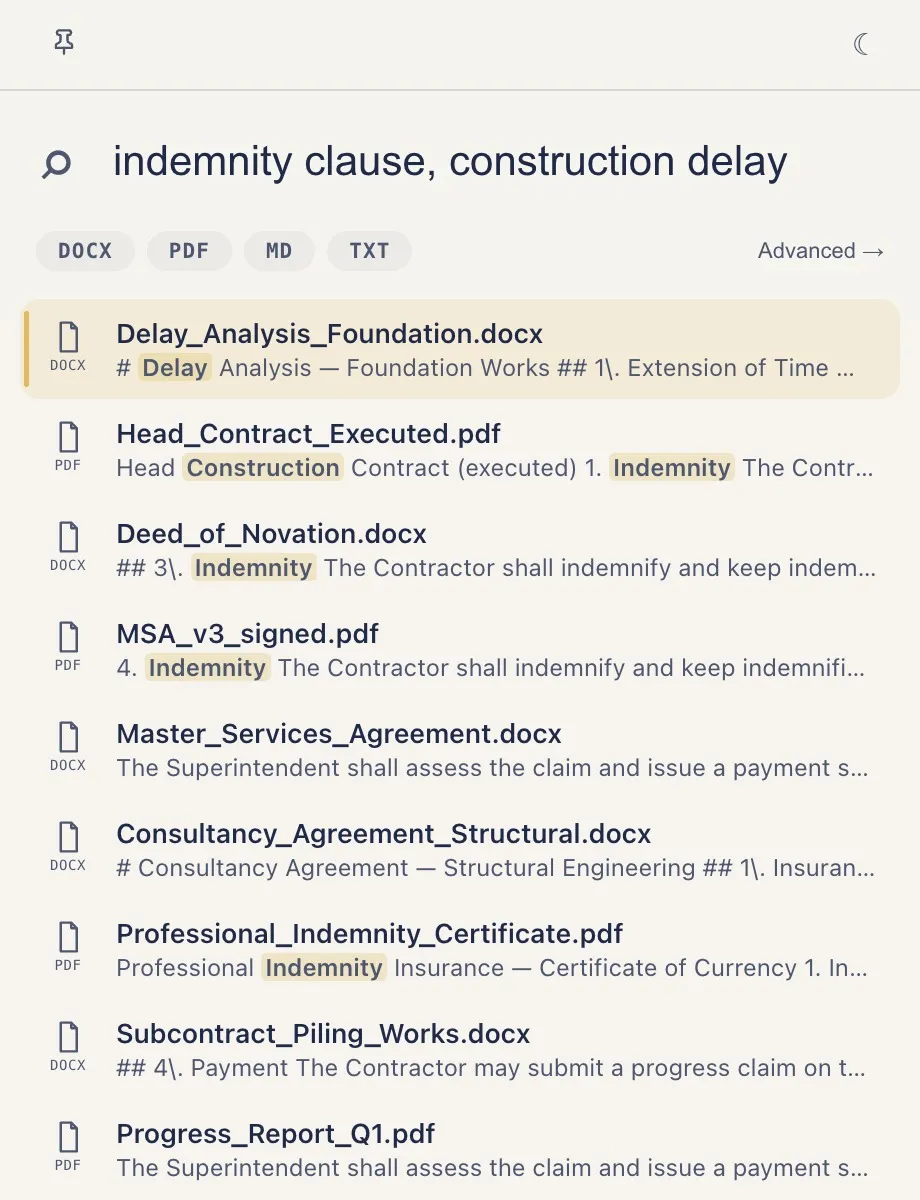
The search layer is where Fossick comes in. You point it at a folder, it builds an index on your computer, and you type what you remember about a note. It returns the files whose content is closest in meaning, not just the ones that contain your exact words.
The privacy properties are concrete:
- 100% on-device. Text extraction, OCR, embedding and search all run locally. Documents are never uploaded.
- Works with Wi-Fi off. You can unplug the network and search still works. Only licensing touches the internet.
- No account for your files. There is no cloud workspace holding a copy of your notes.
If part of your archive is scanned handwritten notes or screenshots, on-device OCR makes those searchable too; see how to search scanned PDFs and images locally.
How finding notes by meaning works on your own computer
Semantic search turns each passage of text into a list of numbers that represents its meaning, then compares your query against those numbers instead of matching keywords.
Semantic search aims to match the intent of a query rather than its exact wording. Classic keyword search indexes individual terms; if you search "supplier pulled out" and your note says "vendor terminated the agreement", a keyword index finds nothing. A semantic index recognises that the two phrases mean roughly the same thing.
Fossick does this with a small open sentence-embedding model, all-MiniLM-L6-v2, which maps text to 384-dimensional vectors. The quantized version Fossick ships is about 22 MB and runs locally, so nothing needs to be sent to a server to understand your query.
What that means day to day:
- You can search for "the call where the client worried about timelines" without remembering the date, file name, or the word "timeline".
- Notes written months apart in different styles can surface together if they discuss the same idea.
- Exact phrases still help; meaning-based ranking just stops you from being dependent on them.
On speed, Fossick measured about 15-20 ms median per semantic search over a 52-document folder on an Apple M1 MacBook with 8 GB RAM. Indexing that same mixed folder from scratch, including OCR on scanned pages, took about 81 seconds; later re-checks are incremental, so only new or changed files are re-processed. For more on the difference, see semantic search vs keyword search.
Notion search vs local search tools compared
Notion's search is built for a shared cloud workspace; a local semantic tool is built for private files on one computer.
| Notion search | Basic desktop keyword search | Fossick | |
|---|---|---|---|
| Where notes live | Notion's cloud | Your disk | Your disk |
| Finds by meaning | Not its core design | No, exact terms | Yes |
| Works fully offline | Depends on sync state | Yes | Yes, Wi-Fi off |
| Scanned notes and images | Limited | Usually not | On-device OCR |
| Editing and collaboration | Yes | No | No |
The table shows the trade-off honestly. Notion wins on writing, databases, sharing and real-time collaboration. Built-in tools such as Spotlight or Windows Search keep files local but match words, not ideas, and often skip scanned content. Fossick sits in a specific spot: local files, meaning-based retrieval, and no network required.
Many people end up using both: Notion for non-sensitive team material, and local files plus Fossick for anything confidential.
Setting it up: moving sensitive notes into a searchable local folder
The setup is a one-time move of sensitive notes into a local folder, followed by pointing Fossick at it.
- Decide what leaves the cloud. Not everything needs to. Pick the notebooks or pages that hold client, personal or confidential material.
- Export from Notion. Notion offers export options such as Markdown and HTML. Exported files are plain documents you fully control. Remove the originals from Notion afterwards if the goal is to stop holding them there.
- Choose a home folder. Keep it on a disk protected by your operating system's full-disk encryption, as you would any confidential material.
- Keep writing locally. New notes can be Markdown, Word or text in whatever editor you like. Drop scans and screenshots in the same folder.
- Install and index. Download Fossick for Windows or Mac, add the folder, and let it build the index. When files change, it re-processes only those.
- Search the way you remember. Type a description of the note, not a guess at its filename.
You can test this on real material first: Fossick is free to try with no sign-up or card, limited to 1 folder and up to 200 files. A one-time purchase of US$19.99 unlocks every folder and file, includes every update to Fossick, and comes with a 14-day money-back guarantee; details are on the pricing page.
What Fossick does not replace
Fossick replaces cloud-based note search, not the rest of Notion.
Being clear about this saves disappointment:
- It is not a note editor. You write in your own tools; Fossick finds the files afterwards.
- It does not sync. There is no cloud copy, so notes on your laptop are not automatically on your phone. That is the point, but it is a real trade-off.
- It has no collaboration features. No shared pages, comments or permissions.
- It is search, not chat. There is no chatbot, no generative AI and no summaries. Fossick returns the documents that match your query; reading them is still your job.
- It does not organise for you. It does not create databases, tags or backlinks. It makes loose folders findable, which for many people removes the need for heavy organisation in the first place.
If your requirement is "I need to find what I wrote, privately, without my notes leaving this computer," this setup fits. If you need a shared, structured team wiki, Notion or a similar tool is still the right choice for that non-sensitive material. For a broader look at local options, see offline document search.
Frequently asked questions
Is there an offline alternative to Notion that keeps notes off the cloud?
Yes. The most private approach is to store notes as local files (Markdown, Word, text or PDF) and search them with an on-device tool. Fossick indexes and searches those files entirely on your computer, works with Wi-Fi off, and never uploads documents.
Can Fossick search notes I export from Notion?
Yes, as long as they are in a supported format. Notion exports such as Markdown and HTML are both supported, alongside PDF, Word, plain text, CSV and others. Once the exported folder is indexed, you can search it by meaning.
Does Fossick use AI to answer questions about my notes?
No. Fossick uses a small on-device embedding model only to compare meaning for search. It has no chatbot, no generative AI and no summaries; it shows you which notes match and you open them yourself.
Will Fossick find handwritten or scanned notes?
It runs OCR on scanned PDFs and images (PNG, JPG) on-device, so text in scans and photos becomes searchable. Results depend on how legible the original is, as with any OCR.
Does Fossick work on both Windows and Mac?
Yes, it is a desktop app for Windows and Mac. Indexing and search run locally on either platform, and only licensing uses the internet.